AI kitchen design lets you upload a photo of your current kitchen and preview new cabinet colors, backsplash styles, countertops, flooring, lighting, and overall remodel directions before you spend money on materials or contractors. It is not a substitute for measurements, permits, or professional construction drawings, but it is a useful early planning tool because it helps you compare design choices visually instead of guessing from tiny samples.
For homeowners, renters, real estate sellers, and renovators, the biggest benefit is clarity. A photo-based preview can show whether white cabinets feel too plain, whether dark green lowers the mood of the room, whether a marble-look counter clashes with existing floors, or whether a warm wood direction makes the kitchen feel more expensive.
Key Takeaways
- AI kitchen design is best for exploring style, color, material, and mood before a remodel.
- Upload a clear photo of your actual kitchen so the preview reflects your layout, light, and constraints.
- Use AI previews to compare cabinet colors, backsplash patterns, countertop looks, flooring, hardware, and lighting.
- Do not treat an AI image as a construction plan; confirm measurements, codes, appliance clearances, and budgets separately.
- The most useful workflow is to generate several directions, shortlist two or three, then validate them with samples and a contractor or designer.
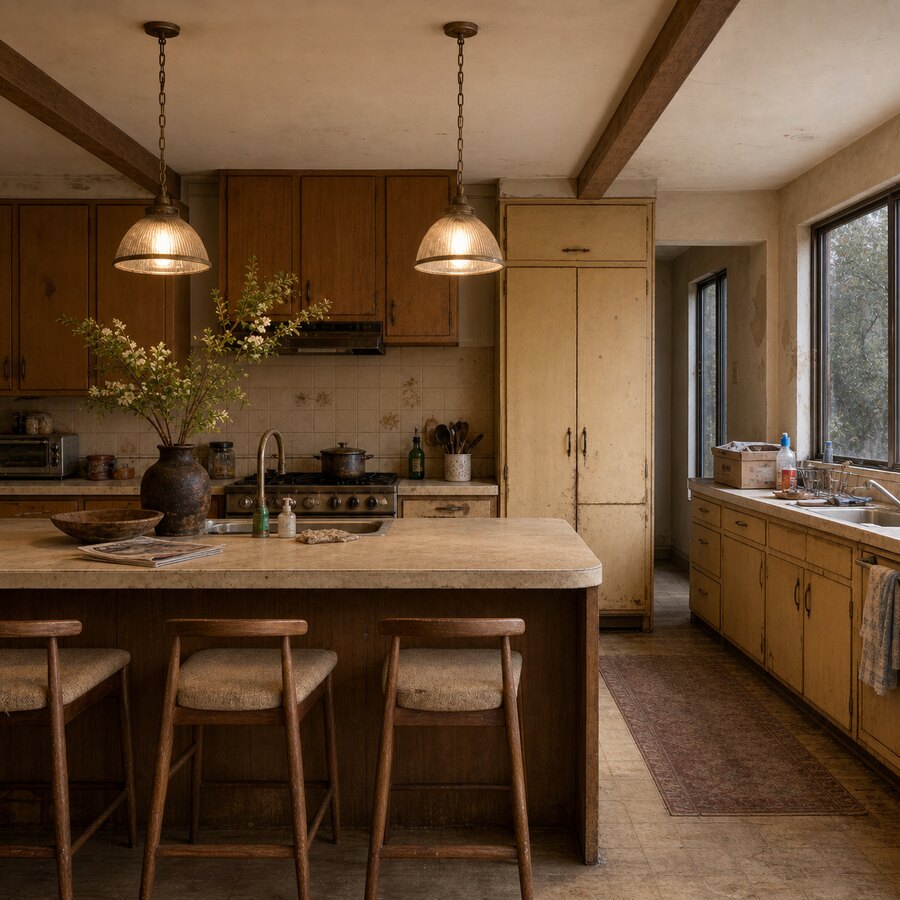
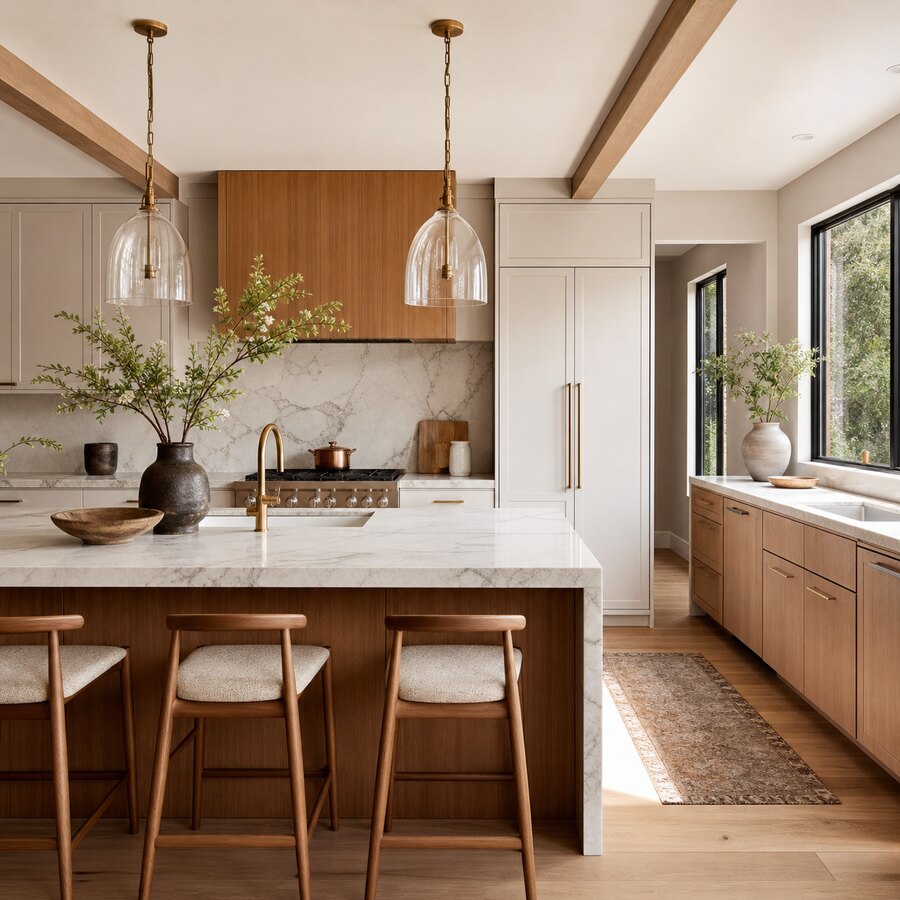
What Is AI Kitchen Design?
AI kitchen design is the process of using artificial intelligence to generate visual remodel concepts from a room photo, written prompt, or both. Instead of starting with a blank mood board, you begin with your actual kitchen: the current cabinets, floor, window placement, island, appliances, ceiling height, and natural light. The AI then creates design variations that keep the basic room context visible while changing the style.
The most practical use is not to ask for a perfect final design. It is to answer early questions quickly: Should the kitchen go modern or transitional? Would a lighter counter brighten the space? Is a bold backsplash too busy? Do black pulls look sharp or harsh? Does a two-tone cabinet layout help the room feel more custom?
That makes photo-based AI useful before you visit a showroom, buy samples, or request contractor bids. If you want to experiment yourself, you can try the AI studio with a kitchen photo and compare several remodel styles in minutes.
Why Uploading a Photo Works Better Than Generic Inspiration
Generic kitchen inspiration is helpful, but it often hides the hard parts. A Pinterest kitchen may have tall ceilings, perfect daylight, hidden appliances, custom millwork, and a layout that has nothing to do with your room. When you upload your own photo, you see design ideas against your real constraints.
This matters because kitchens are expensive to change. Cabinet finish, countertop thickness, backsplash scale, appliance color, and floor tone all affect one another. A style that looks beautiful in a catalog can feel cold, cramped, or visually heavy in a real home. AI kitchen design gives you a low-risk way to test those relationships before the project becomes expensive.
For more examples of how image previews can change decision-making, browse the before and after gallery. The same principle applies across rooms: the more closely the input photo matches the real space, the more useful the output becomes as a planning reference.
What You Can Test With AI Kitchen Design
A good AI kitchen preview should help you explore the parts of a remodel that people struggle to imagine. The goal is not just to make a pretty image. The goal is to reduce uncertainty around high-impact decisions.
Cabinet Colors and Finishes
Cabinets dominate most kitchens, so color is usually the first decision to test. You can compare white, cream, greige, navy, sage green, charcoal, walnut, oak, black, or two-tone combinations. AI previews are especially useful when you are deciding whether to repaint existing cabinets or replace them entirely.
When reviewing cabinet concepts, pay attention to how the color works with your floor and natural light. White cabinets may brighten a small kitchen, but they can also look flat if the room lacks texture. Dark cabinets can feel elegant, but in a narrow kitchen they may make the walls feel closer. A photo preview helps you see that tradeoff faster.
Backsplash Styles
Backsplashes are small compared with cabinets, but they have a strong visual effect. AI can help you compare subway tile, zellige-style tile, slab backsplash, marble-look surfaces, vertical stacked tile, mosaic accents, or quiet neutral ceramic. It can also show whether a bold backsplash should cover the full wall or stay limited to the cooking zone.
Use the preview to check scale. A busy pattern may look exciting in isolation but distracting behind open shelves. A simple backsplash may look too plain unless the counter or hardware adds enough detail.
Countertops and Waterfall Edges
Countertops shape the kitchen’s perceived quality. AI kitchen design can help you compare marble-look quartz, warm butcher block, dark stone, concrete-look surfaces, terrazzo-style counters, or a clean white counter with subtle veining. If you have an island, you can also test whether a waterfall edge feels modern or too formal for the room.
Remember that the image is a style preview, not a material specification. Real countertop choices still depend on durability, maintenance, slab availability, seam placement, cost, and fabrication details.
Flooring, Lighting, and Hardware
Many remodel plans focus on cabinets and counters, but the room often changes most when flooring, lighting, and hardware work together. Use AI to test warm wood floors versus pale tile, black pulls versus brass knobs, globe pendants versus linear fixtures, or under-cabinet light strips.
These details are easy to overlook because each one seems small. In a finished kitchen, they create the overall mood: calm, coastal, modern, farmhouse, minimal, traditional, or luxury.
How to Get a Better Kitchen Preview From Your Photo
The quality of the input photo affects the usefulness of the output. A blurry, dark, or heavily angled photo gives the AI less reliable information. Before uploading, take a few minutes to capture the room clearly.
- Stand far enough back to show cabinets, counters, floor, ceiling, and major appliances.
- Use natural daylight when possible, but avoid harsh direct sun that blows out surfaces.
- Clear counters enough that clutter does not confuse the design direction.
- Keep the camera level so cabinets and walls do not look distorted.
- Take more than one angle if your kitchen has an island, peninsula, or dining connection.
Then write a prompt that is specific but not overloaded. For example: “modern warm kitchen, oak lower cabinets, white upper cabinets, quartz countertop, handmade tile backsplash, brass hardware, brighter lighting.” If the first result is close but not right, adjust one variable at a time. This makes it easier to learn what is actually improving the design.
A Practical Workflow Before You Remodel
AI is most useful when it fits into a real planning process. Start broad, then narrow down. Generate several directions first: light and airy, warm organic, modern black-and-white, classic shaker, colorful cabinet, or high-end contemporary. Do not decide based on the first attractive image.
Next, compare the options against your actual goals. Are you trying to make the kitchen feel bigger? Improve resale appeal? Match the rest of the home? Keep the project budget-friendly? Create a dramatic personal style? A kitchen for listing photos may need a different direction than a forever-home kitchen.
Once you have two or three strong directions, bring the ideas back into reality. Collect physical samples for cabinet paint, countertop, backsplash, and flooring. Check them in your kitchen at morning, afternoon, and evening light. If walls are moving, plumbing is changing, or appliances are being relocated, talk with a licensed contractor, architect, or kitchen designer before assuming the visual concept is buildable.
If your kitchen is small, the related guide on renovating a small kitchen on a budget is a useful next read because it focuses on layout, color, and budget decisions. You may also find the broader article on interior design trends you can preview with AI helpful when deciding whether a trend will age well.
Where AI Helps, and Where It Does Not
The honest answer is that AI kitchen design is excellent for visual exploration and weak for technical planning. It can help you see style options, communicate preferences, and avoid costly aesthetic mistakes. It can also help couples, families, or clients align around a direction because everyone can react to the same visual reference.
But an AI image should not decide cabinet dimensions, structural changes, electrical plans, ventilation requirements, plumbing routes, appliance clearances, or local code compliance. It may also invent details that look plausible but are not practical, such as a sink where plumbing would be difficult, a range without proper clearance, or shelves that would block a window.
Treat the preview as a design conversation starter. The best outcome is a clearer brief: “We like warm oak lowers, quiet white uppers, a light stone counter, no busy backsplash, brass accents, and brighter under-cabinet lighting.” That brief is much easier to take to a contractor, designer, or showroom than a vague request for “something modern.”
Soft CTA: Try a Kitchen Style Before You Commit
If you are choosing cabinet paint, comparing backsplash ideas, or wondering whether a remodel direction will work in your actual kitchen, upload a clear photo and try the AI studio. Use the result as a visual planning aid, then confirm materials, measurements, and build details before making final purchases.
FAQ
Can AI design my kitchen from a photo?
Yes. AI can use a photo of your current kitchen to generate visual remodel concepts with different cabinets, counters, backsplash styles, lighting, and decor. The result is best used for inspiration and planning, not as a final construction plan.
Is AI kitchen design accurate?
It can be visually useful, especially for color and style decisions, but it is not fully accurate for measurements, building codes, appliance clearances, plumbing, or electrical work. Always verify technical details with professionals before remodeling.
What photo should I upload for the best kitchen result?
Upload a bright, clear, wide photo that shows cabinets, counters, floors, appliances, ceiling, and windows. A level camera angle and reduced counter clutter usually produce more useful previews.
Can AI help me choose cabinet colors?
Yes. Cabinet color is one of the best uses for AI kitchen design because you can compare white, wood, green, navy, black, cream, or two-tone options in the context of your real kitchen.
Should I use AI before talking to a contractor?
Yes, if you use it to clarify style preferences and priorities. Bring the strongest previews to a contractor or designer, then ask them to confirm what is practical, code-compliant, and realistic for your budget.
