How to scan a room and open it in 3D
- Start a scan. In the RoomRenovation app, open the Rooms tab, name the room and start scanning. Walk slowly around the edge of the room and point the camera at each wall, door and window.
- Review it on the phone. The finished scan is saved on the device. Open it in 3D, or export it as JSON or USDZ.
- Send it to the web studio. Sign in on the Account tab, then tap “Send to web studio” on the scan. The app opens a private link that loads the scan into your web account.
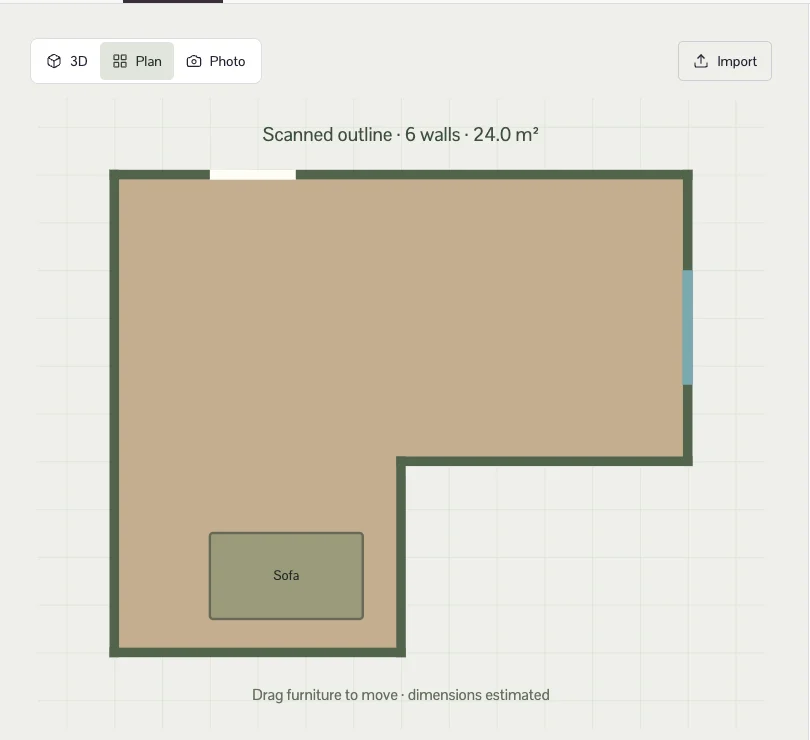
- Edit the room. The studio shows the scanned outline with its wall count and floor area. Adjust the height, move doors and windows along their wall, and rearrange or replace furniture.
- Price and share it. Floor area and wall length come from the real outline, so the budget reflects the room you scanned. On a paid plan, export DXF, IFC or GLB; photoreal renders use image credits.
What the scan captures
| Element | Captured | Notes |
|---|---|---|
| Walls | Yes | Length, height and angle of each wall; the room is rotated to line up with its longest wall |
| Doors, windows, openings | Yes | Width, height and sill, attached to the wall they belong to |
| Main furniture | Yes | Size, position and type (sofa, table, chair, bed, storage and similar) |
| Materials and colours | No | Choose floor and wall finishes in the studio |
| Wall thickness, pipes, wiring | No | Walls use a standard 12 cm thickness; services need a site survey |
Tips for a cleaner scan
- Use good, even light and open the curtains; LiDAR copes with dim rooms, but the camera tracking works better in light.
- Move slowly and keep the phone at chest height. Scan each wall from corner to corner before moving on.
- Open internal doors you want recorded as openings, and clear clutter from the floor in front of walls.
- Scan one room at a time and give each scan a clear name, such as “Main bedroom”.
Privacy
Scans stay on your device until you choose to send one. A sent scan contains geometry only (walls, openings and object boxes), no photos. The link it creates holds a long random code and expires after 30 days; share it only with people you want to see the room.
If you prefer to keep a scan out of a planning conversation entirely, export the RoomPlan JSON and import it into the studio yourself, or start from measured dimensions instead.
Questions people ask
Which iPhones and iPads can scan a room?
Models with a LiDAR Scanner: iPhone Pro and Pro Max models from iPhone 12 Pro onwards, and iPad Pro models with LiDAR. The RoomRenovation app needs iOS 18 or later.
How accurate is a LiDAR room scan?
Good enough to plan layouts and compare budgets, but it is still an estimate. Check critical dimensions with a tape measure before ordering cabinets, flooring or anything made to size.
What if my phone has no LiDAR?
Create the room by entering its width, depth and height in the web studio, then add doors, windows and furniture. You can also import a RoomPlan JSON file created on another device.
Is the scan uploaded automatically?
No. Scans are saved on your device. The scan geometry is sent only when you tap “Send to web studio”, and the link it creates expires after 30 days.
Can I export the scan?
Yes. The app exports the scan as JSON or USDZ, and the web studio exports the edited room as a CSV or PDF brief, plus GLB, DXF, IFC and JSON on a paid plan.
Open the room studio How the 3D planner works · Plans and prices